Meta CAPI
Meta CAPI sends server-side Lead conversion events to Meta for click-to-WhatsApp attribution. WaaPY sends the event when a customer messages you from an ad, or on demand from the ticket.
Configuration
Add a Meta CAPI integration from + Add Integration. The wizard asks for:
- Name: unique within the workspace.
- Meta Dataset ID / Pixel ID: your Meta dataset or pixel ID.
- Meta Access Token: a Meta Conversions API access token.
- API Version:
v21.0,v22.0, orv23.0(defaultv21.0). - Test Event Code (optional): required only to use Send Test.
- Send Lead automatically on ad click: when on, the
ctwa.leadevent is sent automatically when a customer messages from a click-to-WhatsApp ad. Turn off to send it manually from the ticket.
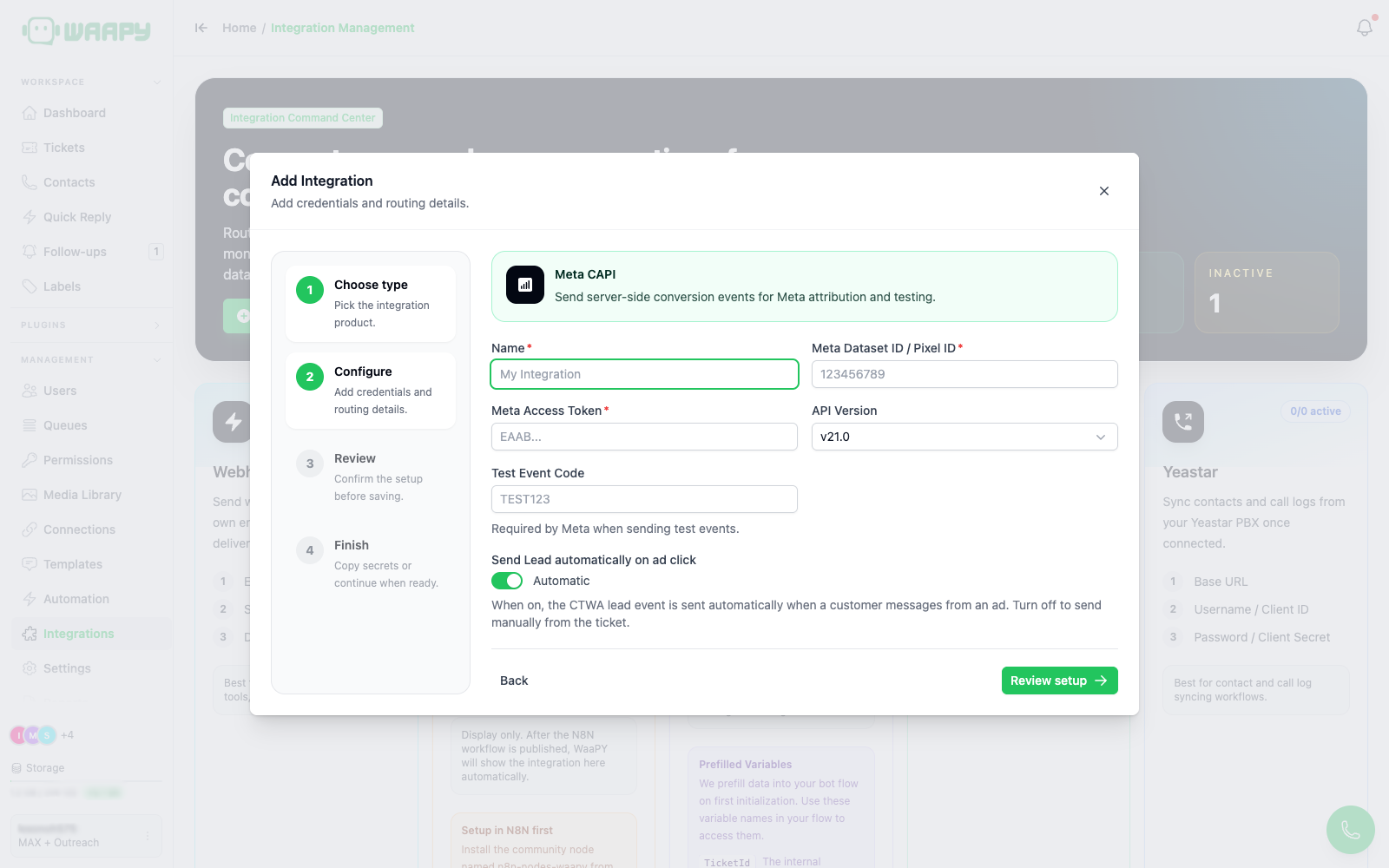
The access token and dataset ID are stored, and the token is redacted (********) when read back.
Automatic Sending
When Send Lead automatically on ad click is on (default), WaaPY sends a ctwa.lead event automatically whenever a customer messages you from a click-to-WhatsApp ad on a WhatsApp or WaaPY ticket. The event is deduplicated per (integration, message), so it is never sent twice for the same message.
Manual Sending
You can also trigger a lead from a ticket. Open the ticket and click Send CAPI Lead in the ticket header. Use Retry CAPI Lead when a previous attempt failed.
A picker opens with the Meta CAPI accounts in the workspace. Select the accounts that should receive the event, then click Send. You can select up to 20 integrations per send.
WaaPY attributes the event to the latest inbound message that carries click-to-WhatsApp ad data. When no message carries ad data, it falls back to the latest inbound message and leaves the ad fields out. Only WhatsApp and WaaPY tickets support manual sending, and an event that was already sent for a message is never sent again.
The picker header shows the outcome of the last attempt:
| Status | Meaning |
|---|---|
| Sent | Meta accepted the event. |
| Sending | The request is still in flight. |
| Failed | Meta rejected the event. Check the error in Integration Logs. |
| Partial | Some of the selected accounts accepted the event and others did not. |
| Not sent | No event was sent for this message. |
Each account in the list carries its own badge: Sent, Pending, Failed, Not sent, or Sending.
A toast confirms the result: "CAPI lead event queued." after a send, or "No new CAPI lead events sent." when every selected account already received an event for that message.
When a send is blocked, the picker shows the reason:
- Channel not supported: only WhatsApp and WaaPY tickets can send lead events.
- Integration not active: the Meta CAPI integration is inactive. Turn it on with the status toggle.
- Already sent: the event was already sent for this message.
- Sending in progress: a send for this message is still running. Wait a moment, then retry.
- No inbound message: the ticket has no inbound message to attribute.
If the workspace has no Meta CAPI integration yet, the ticket shows a toast with an Open integration settings shortcut.
What Meta Receives
WaaPY sends the conversion event to Meta's Conversions API using the dataset ID, access token, and API version from the configuration.
The event is a Lead with the action source chat. It carries the contact's phone number and email in Meta's hashed format, the external contact ID, and the click-to-WhatsApp ad data when the message came from an ad. It also carries the workspace, ticket, and contact references, so you can reconcile an event in Meta with the matching ticket in WaaPY.
Testing
Click Send Test on a Meta CAPI card. A Test Event Code is required. WaaPY sends a synthetic Lead event using a test contact (number 15551234567, email [email protected]) so you can verify delivery in Meta's Test Events tool.