Webhooks
Webhooks push workspace events to your endpoint as JSON POST requests. Use them to mirror WaaPY activity into your own systems, trigger automations, or keep an external audit trail.
Create a Webhook from + Add Integration, then choose Webhook in the wizard. WaaPY generates a signing secret on creation and shows it once.
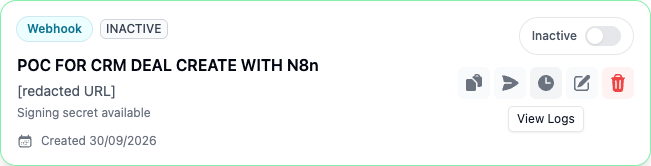
Each Webhook appears as a card in Live Integration Pipelines. The card shows the endpoint URL, whether a signing secret is available, and the buttons for copying the secret, sending a test, viewing logs, editing, and deleting the integration.
Events Delivered
| Event | When it fires |
|---|---|
message.created | A message is created (inbound or outbound). The fromMe field distinguishes direction. |
message.status | A message's delivery or read status changes (ack update). |
ticket.closed | A ticket is closed. |
test | When you click Send Test. |
Request Format
- Method:
POST - Content-Type:
application/json - Headers: any custom headers you configured, plus
X-Waapy-Signature: <secret>if a secret exists. - Body:
{
  "event": "message.created",
  "timestamp": "2026-10-22T10:00:00.000Z",
  "workspace_id": "<workspace id>",
  "data": { }
}
The data object for message.created includes: messageId, ticketId (running number), internalTicketId, ticketStatus, connectionName, channelType, labels, body, fromMe, sender, mediaType, mediaUrl, mediaCaption, quotedMessage, ctwa (click-to-WhatsApp ad data), and contact (id, name, number, identifier, wa_id, email), plus timestamp.
The data object for message.status includes: messageId, ticketId, internalTicketId, ticketStatus, connectionName, channelType, ack, status, reason, and timestamp.
The data object for ticket.closed includes: ticketId, internalTicketId, previousStatus, status, connectionName, channelType, labels, queue, assignedUser, contact, closedBy, and timestamp.
The test payload data is { "message": "This is a test event from Waapy" }.
Verifying Requests
Compare the X-Waapy-Signature header to the secret shown when you created the integration. The header contains the raw secret (not an HMAC), so an exact string comparison is enough.
Delivery, Timeout, and Retries
- Timeout: 10 seconds per attempt (5 seconds for Send Test).
- Retries: 3 attempts with exponential backoff starting at 1 second. Retries happen only on HTTP 5xx or network and timeout errors. A 4xx response is logged as failed and is not retried.
- Each attempt is recorded in Integration Logs (status code, response body truncated to 1000 characters, duration, success flag).
Send Test Result
Clicking Send Test (paper-plane icon) delivers the test event to your URL and shows a success or failure toast with the response.